The Maui ZIP Code Trap
Why Buyers Get Misdirected & How Rabbit IDX Fixes It

The Maui Map Problem

Buying a home in Maui should be exciting—not confusing.
The hitch? On Maui, searching by ZIP code can send buyers miles away from the lifestyle they have in mind.
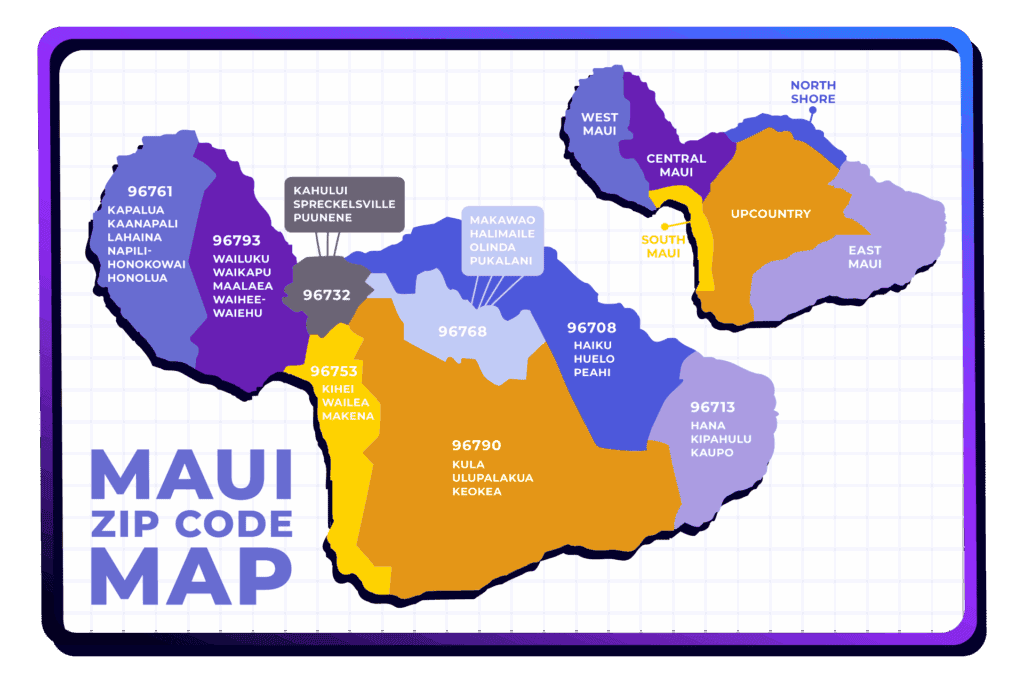
A couple falls in love with Kihei’s sunny beaches and walkable spots, types in “96753,” and suddenly they’re seeing properties in Wailea, Makena, or Maalaea—not what they pictured when they said “Kihei.”
On the mainland, ZIP codes often “feel” like neighborhoods. On Maui, they don’t. And that creates frustration for buyers and extra work for agents.
Rabbit IDX was built to fix this.
Why ZIP Codes Don’t Work Here
Maui is organized around distinct regions—South Maui, West Maui, Central Maui, Upcountry, North Shore, and East Maui—each with its own vibe, climate, and price profile. Locals talk about towns and areas, not ZIP codes.
Take ZIP code 96753. It covers Kihei, Wailea, Makena, and Maalaea—very different markets, all under one number. What a buyer imagines as “Kihei” can easily spill into luxury Wailea golf-course homes or remote Makena oceanfront estates.
Bottom line: one ZIP can span multiple communities with very different lifestyles.
That’s why ZIP-based search wastes time, frustrates buyers, and creates extra back-and-forth for agents.
How People Really Search on Maui
When buyers describe what they want, it sounds like this:
- “Upcountry vibe with cooler air.”
- “Oceanfront in Napili.”
- “Walk to dinner in Kihei.”
They’re thinking place and lifestyle, not five-digit numbers.
Agents work the same way—organizing searches by neighborhood, condo complex, or property type—because that’s what gets buyers to the right listings.
Quick Tips: Searching Maui Homes the Right Way
- Skip the ZIP Codes — They often include multiple, very different areas.
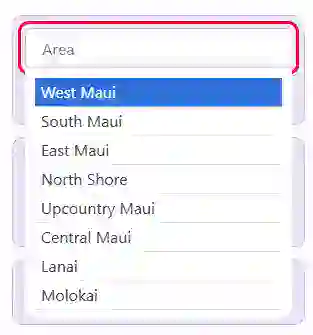
- Search by Place Name — “Kihei,” “Wailea,” “Upcountry,” etc.
- Match the Lifestyle — Decide on oceanfront, walkable, cooler climate, golf course, etc.
- Use Local Filters — Land tenure, view type, property type, condo name.
- Save Time — Fewer “wrong fit” properties means a faster path to the right home.
How Rabbit IDX Fixes the Search Problem
Rabbit IDX is built for how buyers and agents actually search in Hawaiʻi:
- Area-first navigation: Direct menu paths like “Kihei Homes,” “Wailea Condos,” or “Upcountry Homes,” so shoppers land exactly where they expect—no ZIP-code detours.
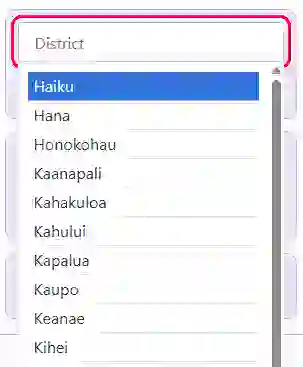
- Local filters that matter: Search by district/area, condo/building name, or listing ID—perfect for the “I already know where” buyer.
- Hawaii-specific details: Land tenure (fee simple vs. leasehold) is clearly presented—critical context that general portals often bury.
The result: buyers see listings that actually match their vision, agents spend less time clarifying, and your site keeps visitors engaged.
Why This Matters to Your Business
When buyers find relevant homes quickly, they trust your site—and are more likely to reach out, book showings, and make offers.
Pages built around place names also perform better in search results, because that’s how people actually look for Maui homes online.
Better targeting means more qualified leads, less wasted time, and more closings.
Stop Losing Leads to Confusing Searches
Every time a buyer ends up in an area they never wanted, you risk losing them to another tab. Rabbit IDX guides shoppers to the listings they meant to find—so you deliver clarity, not clutter.
Want help setting it up? We’ll walk you through it step-by-step—for free.
About Rabbit IDX
Built for Hawaiʻi’s market realities and shaped by agent feedback, Rabbit IDX keeps things simple, affordable, and human—so small teams can compete with big-box portals without losing their brand.
Think: “Your brand, your way.”
Frequently Asked Questions
Does Rabbit IDX include land tenure information?
Yes. Rabbit IDX displays land tenure whenever your MLS provides that data, including Fee Simple and Leasehold. Because tenure is especially important in Hawaii markets, we’ve built tenure-specific filters directly into the search so buyers can browse the property types that matter most to them.
Can I create lifestyle-based search pages (ocean view, beachfront, golf course, etc.)?
Yes. Rabbit IDX supports lifestyle-focused search pages whenever your MLS provides the relevant fields.
You can create pages based on common buyer interests—like ocean view, beachfront, golf course frontage, or homes with a pool—so visitors can jump straight into the lifestyles and features they’re searching for in your market.Can I create pages for neighborhoods, condo complexes, or property types?
Absolutely. You can build dedicated pages for specific areas, communities, or property types using saved criteria, giving clients a direct path to the listings they’re most interested in.
Can I customize which MLS fields appear on my search pages?
Yes. You can tailor search filters and display fields to match how buyers search in your market, including unique local fields your MLS provides.
Is Rabbit IDX mobile‑friendly?
Yes. All search and display components are fully responsive for phones and tablets.